

Translation office software
Orders at the counter, priced from your own list
Find the client by phone, choose the document and languages, and the price, the urgency surcharge and the ready time are worked out for you. Take a deposit and print a receipt with a QR code in under a minute.
- Free demo on request
- A private database for each office
- Arabic and English
Overview
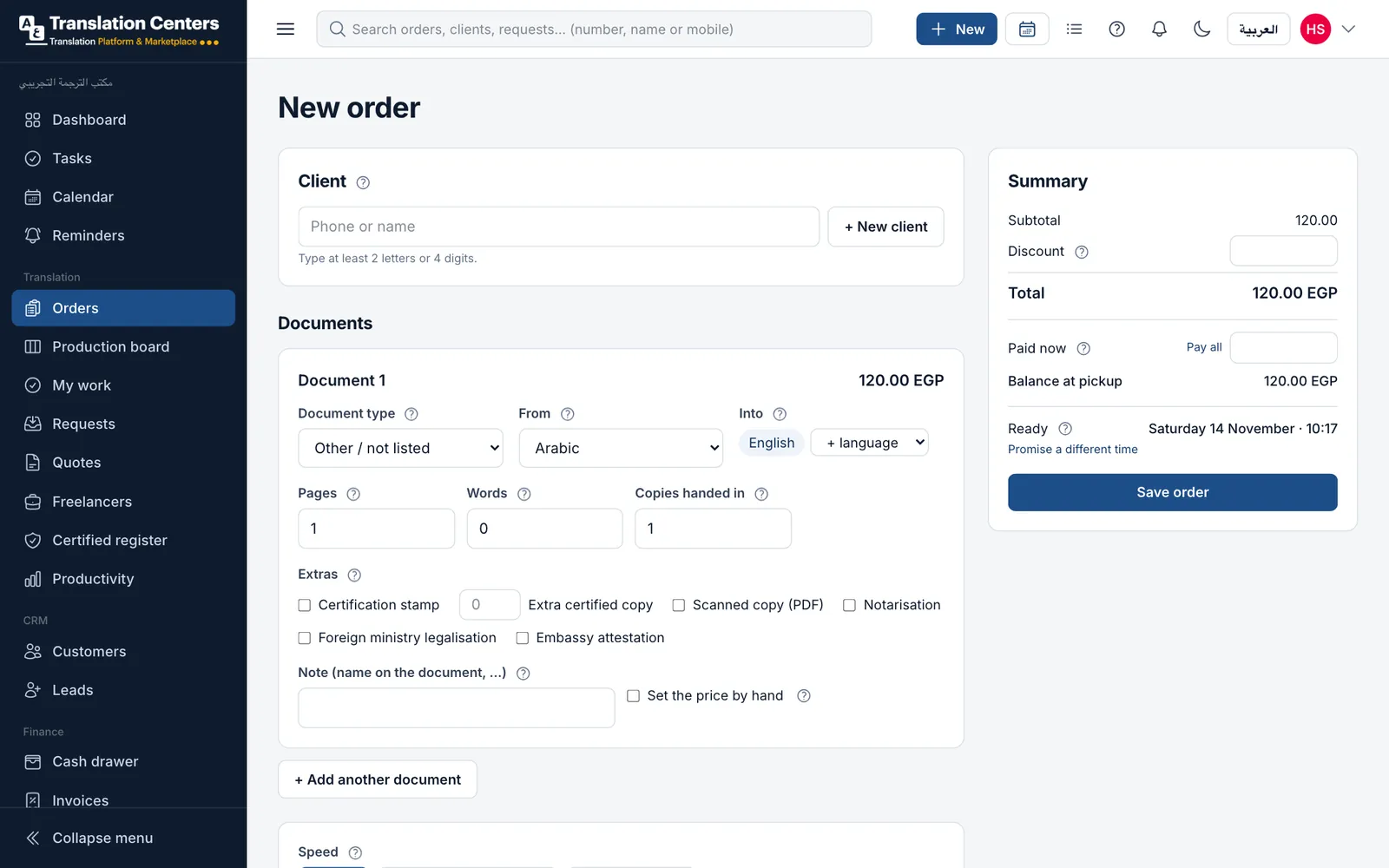
Most of a translation office’s day starts at the counter: a client walks in with a birth certificate, a court ruling or a bank statement and asks two questions — how much, and when. The order screen answers both from your own price list and your own opening hours, so every member of your team quotes the same price and promises the same time.
Each order can hold several documents, each with its own languages, pages and extras such as a certification stamp or ministry legalisation. Prices can be set per page, per document, per word or per hour, by language pair, with a minimum charge. When a price must change, staff with the right permission set it by hand and give the reason, so nothing is changed silently.
A guided look at the screen
Real screens from our demo office, with sample data. Tap a number to see what each part does.
See it with your own work
We send you the login details for a demo office full of sample data, usually within one working day. No payment details needed.
How a price is built
Two pages from Arabic into English, express, with a certification stamp: every part of the price comes from your own list, so the counter never has to calculate.
-
Translation, 2 pages+ 240 EGP
-
Express (+25%)+ 60 EGP
-
Certification stamp+ 30 EGP
-
Total330 EGP
More screens
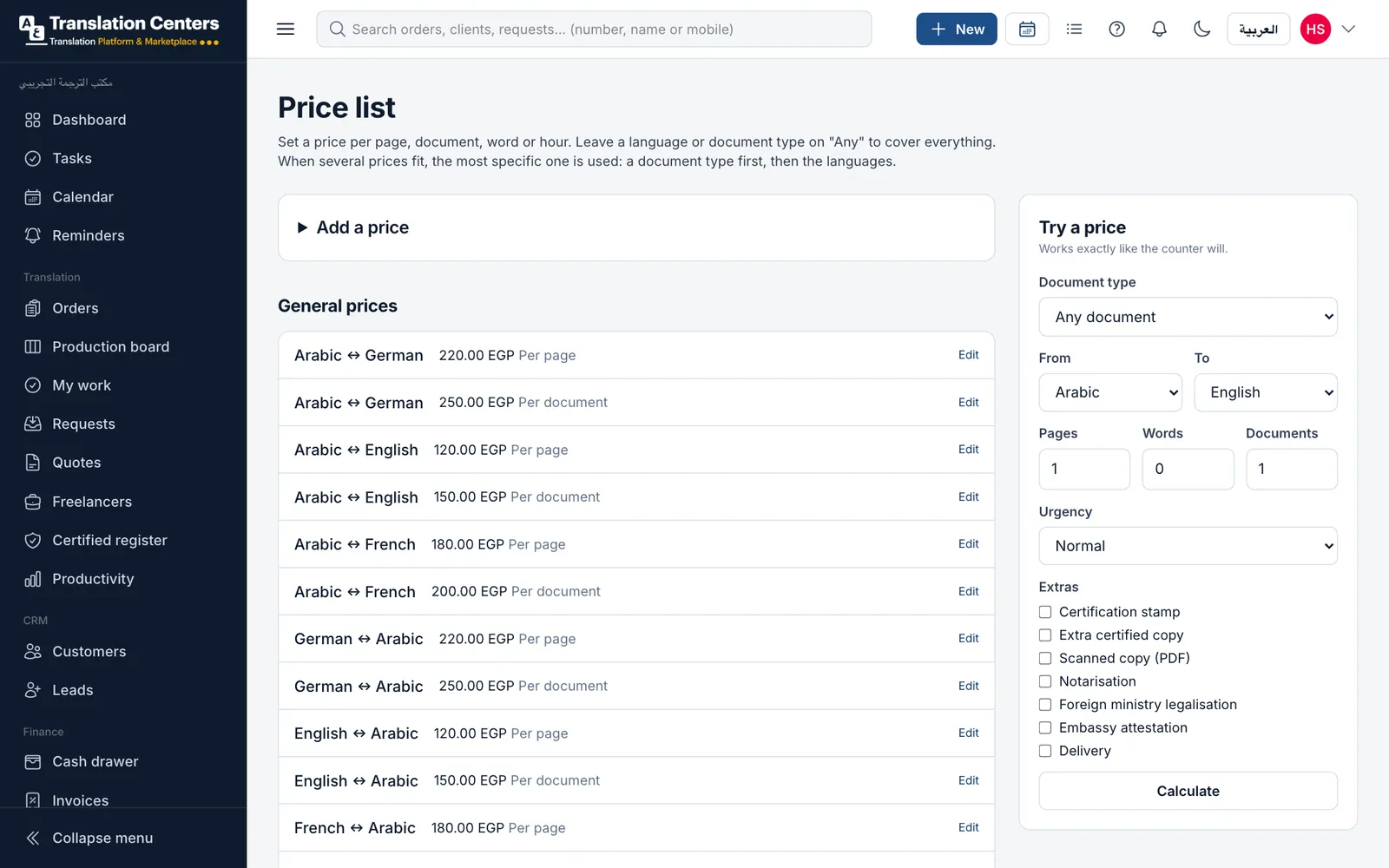
Your price list
Prices by language pair and document type, per page, document, word or hour, with a minimum charge. “Try a price” shows exactly what the counter will charge.
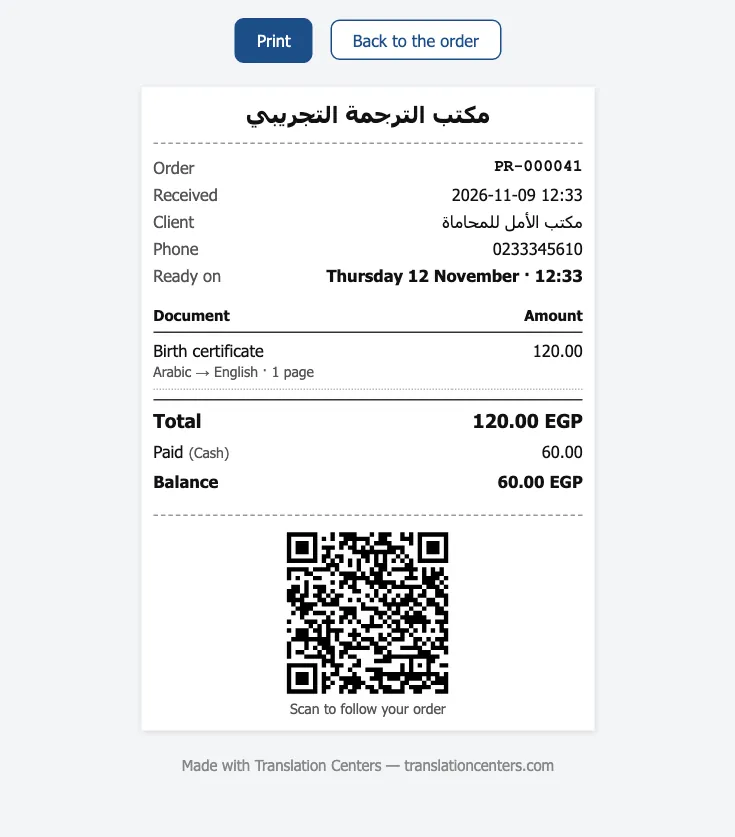
The receipt
An A5 or 80 mm receipt with the office details, the documents, what was paid, the balance and a QR code the client scans to follow the order.
What your office gains
-
One price for everyone
Every member of staff quotes from the same list, so clients get the same price whoever serves them.
-
Promises you can keep
Ready times follow your opening hours, holidays and the work each extra needs.
-
No silent discounts
Discounts and hand-set prices need a permission and a reason, and stay on the order.
-
Fewer phone calls
The QR code on the receipt lets clients follow the order themselves.
Questions offices ask
Can I price per page and per document at the same time?
Yes. Each price is set for a language pair and, if you like, a document type, per page, document, word or hour. The most specific price wins: a price for “birth certificate” is used before the general price for that language pair.
How is the ready time worked out?
From your opening hours and holidays, plus the hours set for the urgency level and for each extra such as legalisation. Staff can promise a different time when needed.
Can we prepare a quote before the client decides?
Yes. Quotes are a separate screen: send it, mark it approved or rejected, and convert an approved quote into an order with one click.
Do we need special printers?
No. Receipts print in A5 on any printer, or 80 mm on a receipt printer, from the browser.
Part of one system
Every part works with the others: a client, an order or a payment is entered once and appears wherever it is needed.
- Production board Every document through translation, review and stamping.
- Freelance translators Offer work by private link, track rates and what you owe.
- Certified register Numbered register entries and a QR check for stamped copies.
- Tracking & delivery QR tracking for clients, ready messages and handover.
- WhatsApp messages Order updates to clients from your own WhatsApp number.
- Invoices, payments & cash Deposits, invoices, monthly statements and a daily cash drawer.
- Reports & dashboard Sales, production and money at a glance, compared over time.
- Clients, team & branches Client records and portal, staff roles and several branches.
Ready to run your office from one screen?
Request a free demo, or ask to sign up and we will send you the payment details. Your office gets its own private database.
From 5,000 EGP a month or 60,000 EGP a year, with no setup fee