

Translation office software
Your office in numbers, every morning
A dashboard that shows each person what needs them today, and reports that show the manager sales, production, tasks and money — compared with the period before, ready to export or print.
- Free demo on request
- A private database for each office
- Arabic and English
Overview
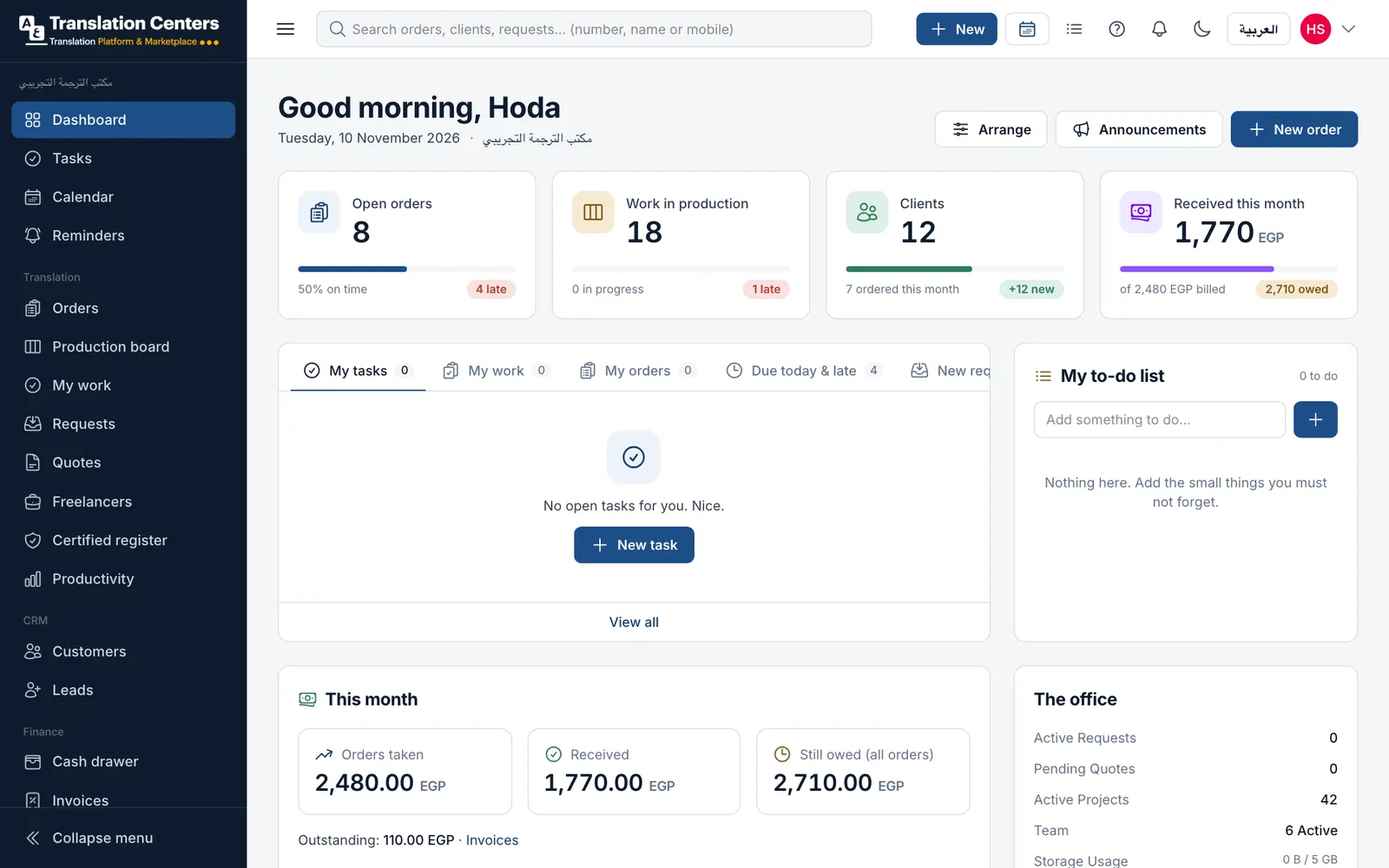
The dashboard is the first screen after signing in. It shows the work waiting for you, your to-do list, this month’s money (for those allowed to see it) and the office at a glance: open orders and the share on time, work in production, late and ready orders. Each person arranges their own boxes: drag, hide or reset them.
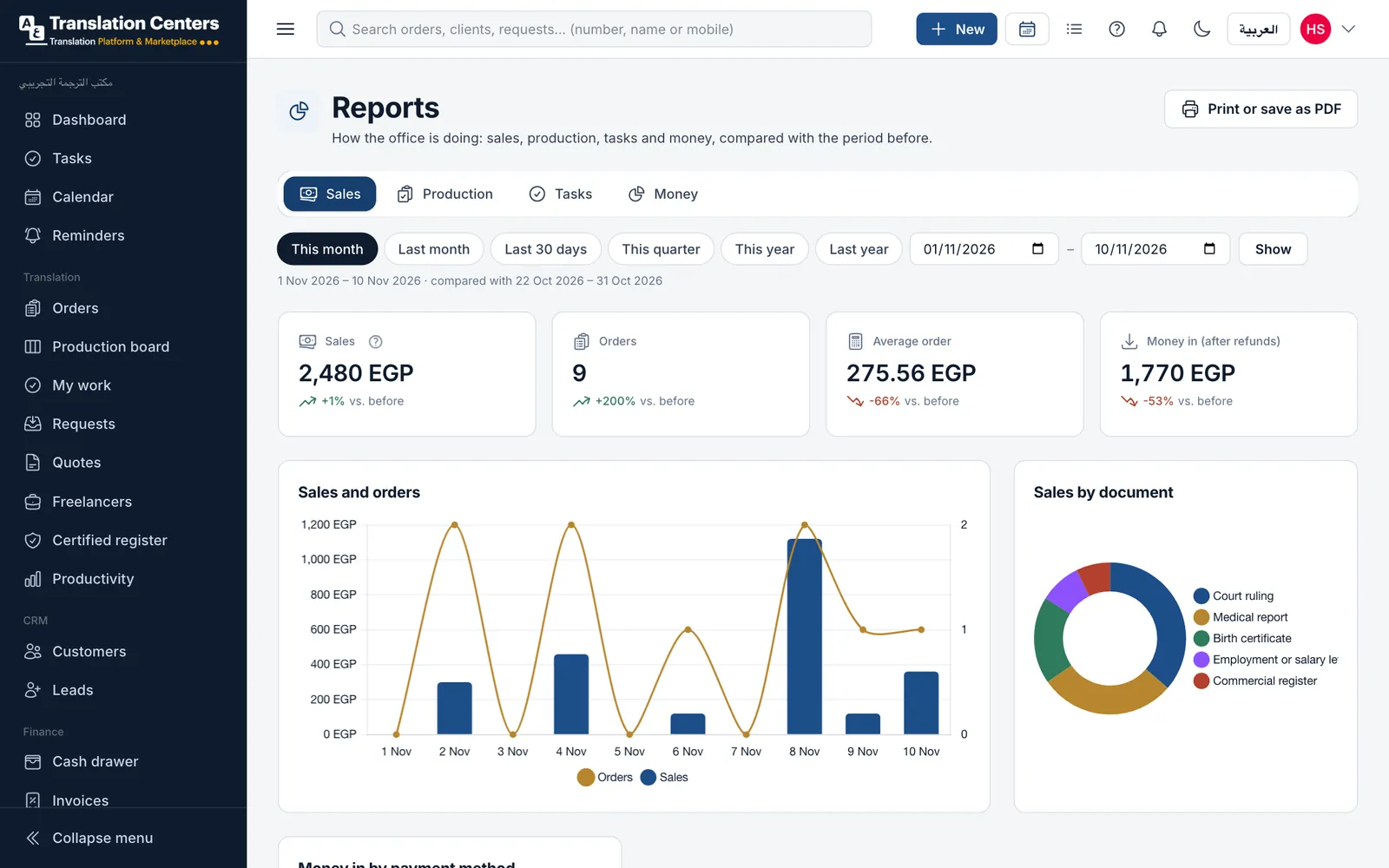
Reports cover four areas: sales, production, tasks and money. Pick this month, last month, a quarter, a year or any dates, and every figure is compared with the period before. Charts show sales and orders, sales by document, money in by method, on-time deliveries and what clients owe by age; tables rank language pairs, clients, branches and people. Export to CSV, or print and save as PDF.
A guided look at the screen
Real screens from our demo office, with sample data. Tap a number to see what each part does.
See it with your own work
We send you the login details for a demo office full of sample data, usually within one working day. No payment details needed.
Sales over ten days
The sales chart compares every period with the one before, so a slow week shows up while there is still time to act.
More screens
The dashboard
Open orders and the share on time, work in production, clients and money received this month, with your work, your to-do list and the office at a glance.
What your office gains
-
A clear start to the day
Everyone sees what needs them first.
-
Trends, not just totals
Each figure is compared with the period before.
-
Profit per order
Fees against freelancer costs, by order, document and language.
-
Export and print
CSV for spreadsheets, or a clean PDF for meetings.
Questions offices ask
Who can see the money figures?
Only people whose role allows it. Others see their own work and the production figures.
Can each person arrange their dashboard?
Yes. Each person can drag, hide and reset the boxes on their own dashboard.
Can we see profit?
Yes. The office reports show fees, freelancer costs and the margin per order, by document type and language pair.
Can reports be exported?
Yes. Export to CSV, or print and save as PDF. Paying offices print with their own logo.
Part of one system
Every part works with the others: a client, an order or a payment is entered once and appears wherever it is needed.
- Orders & pricing Take orders at the counter, priced from your own list.
- Production board Every document through translation, review and stamping.
- Freelance translators Offer work by private link, track rates and what you owe.
- Certified register Numbered register entries and a QR check for stamped copies.
- Tracking & delivery QR tracking for clients, ready messages and handover.
- WhatsApp messages Order updates to clients from your own WhatsApp number.
- Invoices, payments & cash Deposits, invoices, monthly statements and a daily cash drawer.
- Clients, team & branches Client records and portal, staff roles and several branches.
Ready to run your office from one screen?
Request a free demo, or ask to sign up and we will send you the payment details. Your office gets its own private database.
From 5,000 EGP a month or 60,000 EGP a year, with no setup fee